
The Ultimate Guide to AI Wearables: Are Pins and Pendants Ready for Your Daily Life?
Imagine walking through a busy city. You have a great idea for a new project. Instead of stopping, pulling out your phone, unlocking it, and typing a note, you simply whisper to a small pin on your collar. By the time you get home, that idea is already organized into a list on your computer.
This is the promise of AI wearables. Over the last year, we have seen a “Cambrian explosion” of these devices. From sleek neck pendants to clip-on microphones and even smart rings, these gadgets want to free us from our smartphone screens. But after all the hype, are these screenless personal assistants actually ready for regular people to use?
Why We Need AI Wearables
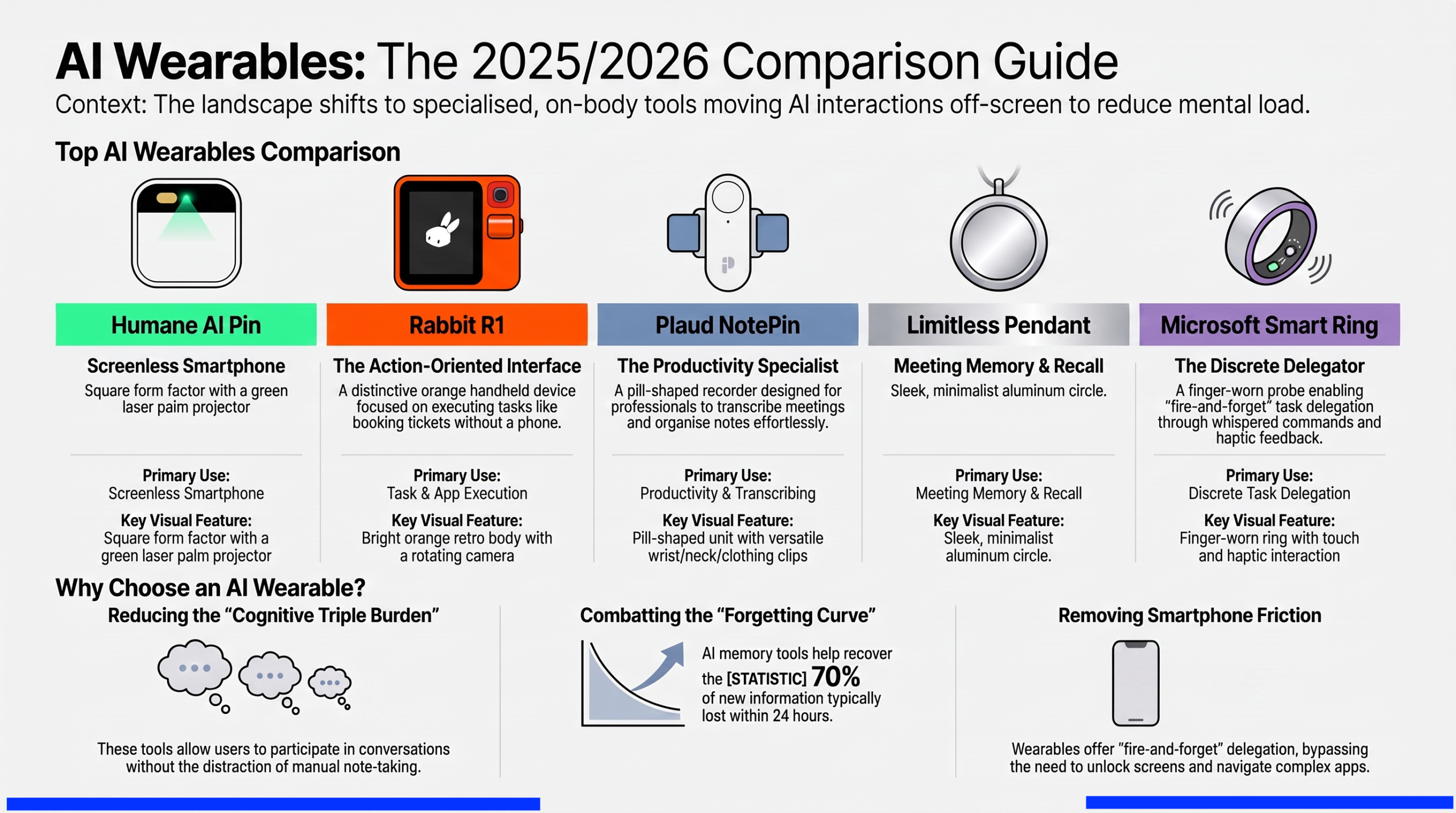
The real problem we face today is not a lack of power; it is “information overload”. Every day, we are bombarded with more information than our brains can handle. Research shows that we forget up to 70% of new information within just 24 hours.
We often reach for our phones to help us remember things, but the phone is also the “epicenter of distraction”. One notification can ruin your focus for minutes. AI wearables aim to solve this by sitting quietly on your body, listening, and “reducing mental load” without forcing you to look at a screen.
The Current State of the Market (A Reality Check)
If you are looking for a device as polished and perfect as an Apple Watch, you might want to wait a year or two. In 2026, the world of AI wearables is still a bit of a “mess”. Some of the most famous devices, like the Humane AI Pin, have already been discontinued or sold.
However, specialized tools are starting to win. The industry is moving away from “doing everything” to “doing one thing well”. Today, most devices fall into three groups:
- Productivity Tools: These record meetings and summarize notes.
- Emotional Companions: These respond to your mood and talk to you like a friend.
- Action Tools: These perform quick tasks like ordering food or booking tickets.
About www.thegadgetnet.com
Before we dive into the specific reviews, it is important to know where to find the best tech information. At www.thegadgetnet.com, we are dedicated to testing the latest “avant-garde” and bizarre tech. Whether it is a 3D laptop or a pin that projects a screen onto your hand, we want to know if it actually makes your life better. Our goal is to cut through the marketing noise and tell you what is “shipping and usable” versus what is just “vaporware”.
Top AI Wearables for 2026: The Notable Six
1. Plaud NotePin S: The Practical Winner
The Plaud NotePin S is currently the “safe bet” for most people. It is a tiny, pill-shaped recorder that you can wear on your wrist, neck, or pinned to your shirt.
- What it does well: It is excellent at capturing interviews and meetings. It has a physical “highlight” button that lets you flag important moments while they happen.
- The Catch: It is not a general assistant. It won’t answer your questions about the weather; it only records and summarizes conversations.
2. Limitless Pendant: The “Memory Necklace”
Limitless (formerly known as Rewind) was designed for “knowledge workers” like lawyers and journalists. It records everything you hear and makes it searchable.
- What happened: Limitless was recently acquired by Meta. While existing users still get support, they have stopped selling the device to new customers. It stands as a “dead product walking” but proved that people love the idea of an “external memory”.
3. Bee: The Budget Daily Logger
At around $49.99, Bee is the most affordable entry into AI wearables.
- What it does well: It generates a “Daily Memory” story rather than just boring meeting notes. It is great for people who want to journal their lives without effort.
- The Catch: It can drain your smartphone’s battery because it relies on your phone to do all the “thinking”.
4. Friend: The Emotional Assistant
Friend is a white neck pendant that focuses on “companionship” rather than productivity.
- What it does well: It detects the mood in your voice and sends supportive messages like “Good luck on your interview today”.
- The Catch: It has raised privacy concerns because it is “always-listening” to your emotional state.
5. Omi: The Open Source Pick
Omi is built for the “hackers and developers” of the world.
- What it does well: It is fully open-source. This means you own your data entirely. If you know how to code, you can build your own features for it.
- The Catch: It is “rough around the edges.” The connection between the device and the phone app can be unreliable.
6. Rabbit R1: The Task Executor
The Rabbit R1 is a bright orange handheld device with a rotating camera.
- What it does well: It is built to execute tasks like ordering a pizza or booking an Uber without you needing to open an app.
- The Catch: Early versions had many bugs, and it is still evolving to be truly useful for everyone.
Comparison Table: AI Wearables at a Glance
| Device | Price | Best For | Top Strength | Main Weakness |
|---|---|---|---|---|
| Plaud NotePin S | $159 | Professionals | Accurate Transcription | No general AI chat |
| Limitless | $99 | Memory Recall | Searchable past | No longer for sale |
| Bee | $49 | Students/Journaling | Low Price | Drains phone battery |
| Friend | $129 | Emotional Support | Empathy/Mood detection | Not for productivity |
| Omi | $89 | Developers | Privacy/Open Source | Hard to set up |
| Rabbit R1 | $199 | Task Execution | Unique “Action” focus | Software still evolving |
The Pros and Cons of Going Screenless
Pros:
- Undivided Attention: You can stay “in the moment” during conversations instead of staring at a phone.
- High Reliability: Dedicated recorders like Plaud or Recolx can record for 20-30 hours straight—much longer than a phone.
- Discreet Interaction: Tools like AI rings or pins allow you to whisper commands quietly, which is more “socially acceptable” than talking to a giant headset.
Cons:
- The “Confidence Gap”: Without a screen, it is hard to know if the AI actually understood you correctly. You often have to wait for a vibration or an audio “beep” to know a task is done.
- Subscription Costs: Most AI wearables require a monthly fee (often $15 to $30) to keep the AI working.
- Privacy: Having an “always-listening” device around your neck makes some people uncomfortable.
Is the Smartphone Replacement a “Mirage”?
Some people thought AI wearables would replace our phones entirely. Experts now say that was a mistake. The smartphone is very good at being a phone. These new gadgets are best when they solve specific problems that the phone causes, like distraction and forgetting.
The future isn’t about adding more gadgets to charge. It is about “removing friction”. For example, Microsoft research has explored using a “wearable ring” because it is close to the hand and allows for “fire-and-forget” task delegation. You tap the ring, whisper a command, and get a haptic “buzz” when the task is finished. This is much faster than unlocking a phone.
Design Tensions: Trusting the Invisible
One of the biggest hurdles for AI wearables is trust. When an AI acts for you in the background—like booking a table or sending an email—you need to know it did it right.
- Planning Visibility: Good AI design should tell you what it plans to do before it does it.
- Graceful Override: You must always be able to say “Stop”.
Conclusion: Should You Buy One?
If you are a student, a journalist, or a busy manager who spends all day in meetings, a device like the Plaud NotePin S is worth the investment today. It will save you hours of typing.
If you are looking for a “sci-fi” assistant that manages your whole life, you should probably wait. The technology is moving fast, and last year’s “hot product” is often this year’s “e-waste”. The best strategy is to “buy for the job, not the concept”. Find the tool that solves your most annoying daily problem and start there.
Frequently Asked Questions (FAQs)
Q: Do AI wearables require a smartphone? A: Most of them do. They usually pair with your phone via Bluetooth to process the audio and show you the final notes or summaries.
Q: Can I use these devices for phone calls? A: Some, like the UMEVO Note Plus, use special “vibration” tech to record calls directly through the phone’s chassis. Others, like the Plaud Note, can also handle call recording.
Q: Are they waterproof? A: It depends on the model. The Limitless Pendant was designed to be waterproof, and the Plaud NotePin is built to be durable for daily use. Always check the specific specs before wearing one in the rain!
Q: How do I know if it’s recording? A: Most devices have a small LED light or a “Consent Mode” to let others know they are being recorded, which helps with privacy laws.
Q: Will they work with my favorite apps? A: Many now integrate with tools like Notion, Slack, and Zoom to sync your notes automatically.

