
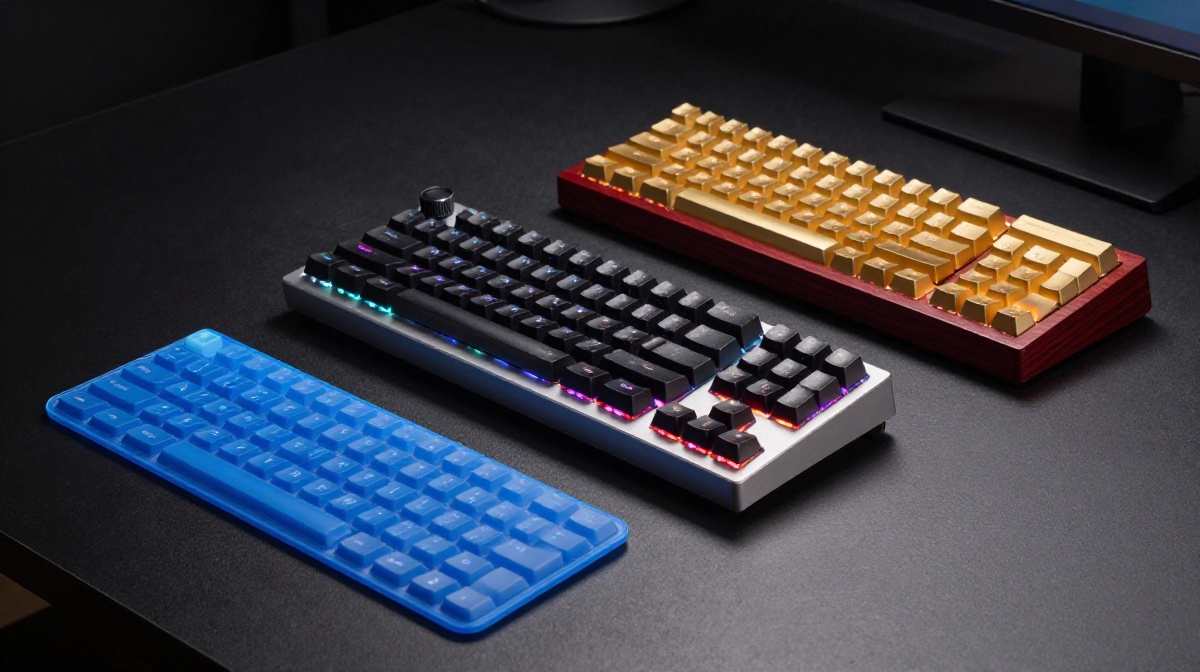
The Ultimate Keyboard Price Guide: From $2 “Wet Lasagna” to $20,000 Luxury—What Are You Really Paying For?
In the rapidly evolving world of technology, the humble keyboard has transformed from a simple input tool into a symbol of status, a precision instrument for gaming, and even a $20,000 piece of performance art. At www.thegadgetnet.com, we pride ourselves on dissecting the tech that defines your daily life, and few devices are as central to the modern experience as the keyboard. But as the price range stretches from the cost of a cup of coffee to the price of a luxury vehicle, a critical question arises: what do you actually get when you pay more?
Through an in-depth analysis of the extreme ends of the market, we can see that the journey from $2 to $20,000 is not just about typing—it is a study in materials science, electrical engineering, and pure enthusiast passion.
The Budget Tier ($2 – $30): The World of Membrane and Scissor Switches
At the lowest end of the spectrum, functionality is the only goal, and even that is sometimes a struggle. A $2 keyboardoften arrives in a tube and is described by experts as feeling like a “wet sheet of lasagna”. These budget boards are almost exclusively membrane keyboards.
Understanding Membrane Technology
In a membrane system, each key rests on a small rubber dome. When you press the key, you squish that dome down until a metal contact pad on the dome connects with a contact pad on the circuit board to register the press. Because there is no rigid internal structure, these keyboards are often mushy and imprecise. At the $2 level, you may even find yourself feeling the “table” underneath your fingers because the build is so thin.
Moving up to $10, you begin to see brand names like Logitech, which provide a slightly better surface and features like kickstands. However, experts at www.thegadgetnet.com and across the industry often warn that kickstands can lead to wrist strain by forcing the hand to bend upward. At $30, the introduction of wireless connectivity and scissor switchesoffers the first major upgrade. Scissor switches use a plastic mechanism to provide a more rigid structure than a standard rubber dome, making the typing feel significantly more consistent.
The Gateway to Performance ($50 – $120): Entering the Mechanical Club
The $50 mark is widely considered the “entry-level” for the mechanical keyboard world. This is a complete shift in technology. Unlike the squishy rubber of a membrane board, a mechanical key is a complex assembly of multiple parts:
- A Keycap: The top surface you touch.
- A Stem: The moving part that travels downward.
- A Spring: Provides resistance and returns the key to its original position.
- Metal Contacts: These sit on either side of the stem and touch when the “actuation point” is reached to register the key press.
Why Mechanical is Superior
The primary benefit of this controlled mechanism is consistency; it feels the same every time you press it. Additionally, mechanical keys do not require you to “bottom out” (pushing the key all the way to the base), which can lead to faster typing and less fatigue. At the $50 level, you also gain features like N-key rollover, allowing every single simultaneous key press to be registered, and RGB lighting.
By the $120 price point, the quality of these mechanical components improves significantly. Instead of budget switches, you find brands like Gateron, which are smoother and less “scratchy”. This luxury tier also introduces sound-absorbing foam and gaskets—tiny elastic pieces sitting between hard components to reduce internal vibration and harsh sounds.
The Three Styles of Switches
At this mid-range level, users must choose their preferred “switch feel”:
- Linear: Smooth and quiet throughout the press.
- Tactile: Adds a small “bump” at the actuation point so you can feel when the key has registered.
- Clicky: Adds both a physical bump and an audible “click” sound.
High-Tech Innovation ($200 – $500): Hall Effect and Premium Build
For those who demand the cutting edge, the $200 range introduces Hall Effect mechanical switches. This technology replaces traditional metal contacts with magnets.
The Power of Magnets
Because Hall Effect switches use magnetic field detectors, they provide a sliding scale of input rather than a simple on/off state. This allows for incredible customization:
- Adjustable Actuation: You can decide exactly how far down you want to press the key before it registers.
- Rapid Trigger: The key can reactivate as soon as it moves up a tiny bit, offering a massive competitive advantage in gaming.
- Analog Mode: Keys can act like a gas pedal in a racing game—the harder you press, the more gas you give the car.
As we move toward $300, the focus shifts to miniaturization and portability. It is possible to find low-profile mechanical boards that are incredibly thin while maintaining the stability and tactility of their larger counterparts.
At www.thegadgetnet.com, we are constantly looking for devices that master the basics while adding premium features, and the $500 tier represents the “everything board”. At this price, you aren’t just getting switches; you are getting three separate layers of dampening, adjustable gaskets, and even OLED displays on the keyboard itself to control lighting and PC settings like fan speed. Furthermore, these boards feature polling rates of up to 8,000 Hz, meaning the keyboard reports its status to the computer 8,000 times per second—a far cry from the 100 Hz found on budget $10 boards.
The “Wild West” of Keyboards ($600 – $20,000): Art and Novelty
Beyond $500, we enter a realm where keyboards are no longer just tools; they are educational devices, art pieces, or massive novelties.
- The Educational Keyboard ($599): The Roly Piano is a keyboard that connects to a mobile app to teach users how to play music. It even uses infrared cameras to track all 27 joints in a user’s hand to ensure proper technique.
- The Aesthetic Powerhouse ($725): Boards like the Angry Meow Neon 80 feature four-dimensional RGB matrix lighting with nearly 400 LEDs and extremely heavy, “buttery” builds that prioritize the sensory experience of typing.
- The Custom Luxury ($2,000): At this level, you pay for hand craftsmanship. This includes exotic materials like Paduk wood (which has a natural fragrance) and 24-karat gold plating. Interestingly, these luxury boards sometimes sacrifice typing feel for pure material value.
The $20,000 Behemoth
Finally, the peak of keyboard absurdity is reached with the $20,000 custom-built giant keyboard. This is not a consumer product but a feat of engineering, featuring keys built 27 times larger than original scale. These giant “Novelties” switches have all the functioning components of a standard switch but on a massive scale, requiring a global production effort just to fulfill the order. While it is functionally a keyboard, it is more of a world-record-breaking statement than a practical input device.
Conclusion: Finding Your Sweet Spot
Is a $20,000 keyboard better than a $50 one? In terms of practicality, the answer is a resounding no. Experts suggest that for the average person, the $100 to $200 range provides 90% of the performance and features that even a high-end enthusiast would desire. Whether it’s the smooth Gateron switches at $120 or the magnetic precision of a $200 Hall Effect board, this is where value meets high-end technology.
At www.thegadgetnet.com, we recommend that before you spend thousands on gold-plated keys or hundreds on a “wet lasagna” tube board, you consider what you value most: is it the sound, the speed, or the sensation of the type? In the end, the best keyboard is the one that makes your work—or your play—feel effortless.

