
Is Dell’s “Budget” Laptop Worth the Price?
For years, the name Alienware has stood for high-end, expensive gaming gear. But in 2026, Dell decided to try something new. They released the Alienware 15 (2026) review model, an entry-level laptop meant for people who want the Alienware brand without the $3,000 price tag. But does this laptop truly belong in the Alienware family, or is it just a cheaper Dell laptop with a fancy logo?
In this deep dive, we look at every corner of this new machine. From the plastic build to the gaming performance, we will see if Dell cut too many corners to lower the price.
A New Look for a Classic Brand
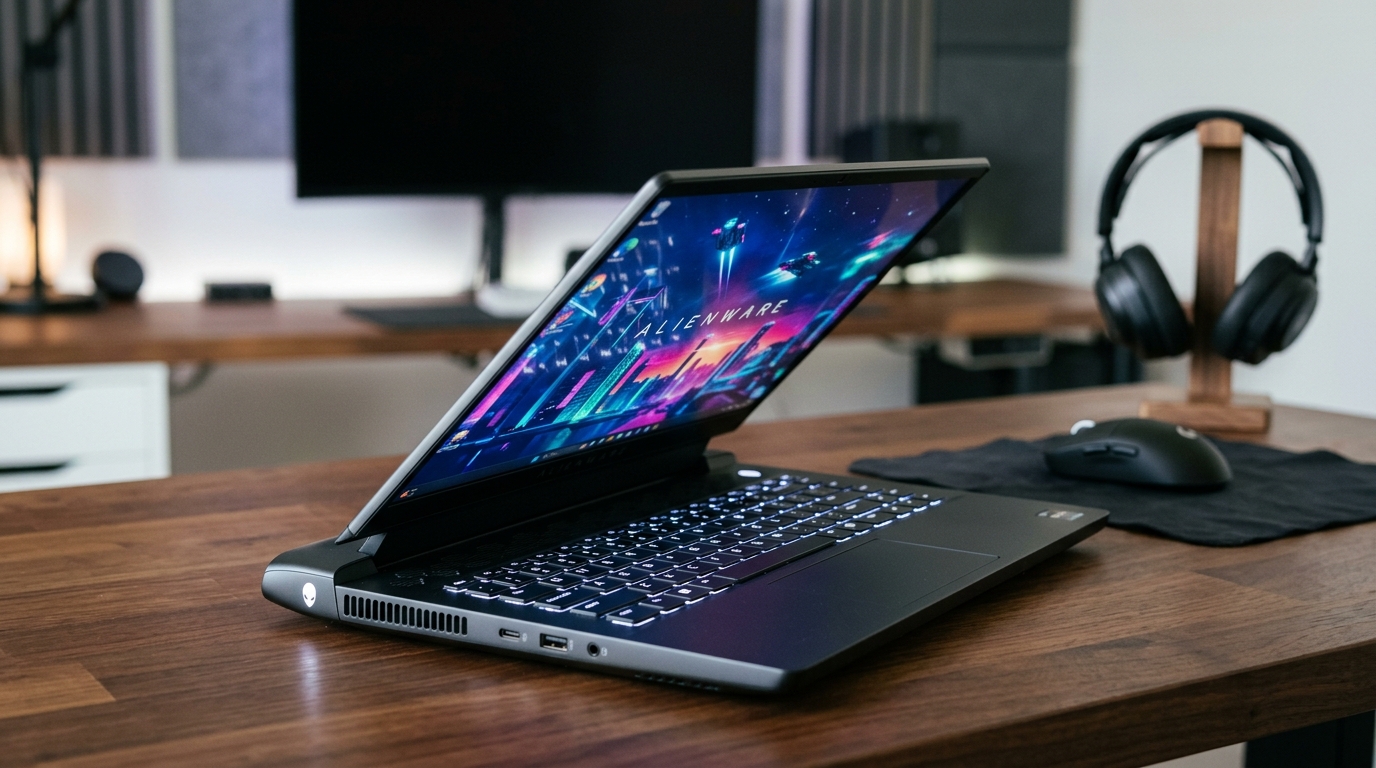
When you first see the Alienware 15 (2026), it looks familiar. It comes in a “Nova Black” finish that has a nice metallic shine when the light hits it. However, as soon as you touch it, you realize where the savings began. Unlike the premium metal versions, this entire laptop is made of plastic.
While it is plastic, it does not feel like a toy. The build quality is fairly sturdy for normal use, though you can feel some flex if you push on the frame. One nice touch is the rounded front edge, which makes it very comfortable to rest your wrists while typing for long hours.
The hinges are another area where Dell spent some time. They claim the hinges can handle being opened and closed 20,000 times. During testing, the lid felt strong even when opened quickly. A clever design choice allows the lid to go all the way back, which prevents you from accidentally snapping the hinges by pushing too far.
Portability and Size
At 5 pounds (2.2kg), the Alienware 15 is not the thinnest laptop on the market, but it is not a brick either. If you add the 180-watt charger, the total weight goes up to about 6.5 pounds. This makes it similar to other budget competitors like the HP Victus or the Lenovo LOQ. In fact, while premium models like the Lenovo Legion 5 are thinner, the Alienware 15 is actually a bit more portable than some of its direct “budget” rivals.
About The Gadget Net
At www.thegadgetnet.com, we are obsessed with finding the best tech for your daily life. We don’t just look at the shiny stickers; we tear these machines down to see if they are worth your hard-earned cash. If you love tech as much as we do, we are always looking for fresh voices! Write for us and share your expertise with our growing community of USA readers. We value honest, human-written content that helps real people make smart buying choices.
Display: The “Budget” Reality
One of the biggest ways companies save money on cheap gaming laptops is the screen. This Alienware 15 (2026) reviewshows that Dell followed that same path. The 15.3-inch screen has a 1920 x 1200 resolution and a 165Hz refresh rate. On paper, that sounds fine, but the actual quality is lacking.
The colors on this panel are some of the lowest measured in a long time. This means games might look a bit dull compared to more expensive screens. The brightness is also just “okay,” reaching 300 nits. In the world of gaming laptops, 300 nits is considered the bare minimum to be usable.
However, it’s not all bad news. The screen response time is actually faster than some more expensive models, like the Alienware 16 Aurora. This means you will see less “ghosting” or blurring during fast-moving games.
Performance and Gaming Power
What is under the hood? The model we tested features:
- Processor: Intel Core 7 240H
- Graphics: Nvidia RTX 5060
- Memory: 16GB RAM
- Storage: 512GB SSD
The RTX 5060 in this laptop has a power limit of 95 watts. This is about 20 watts lower than what some other laptops allow for the same graphics card. Because it uses less power, it doesn’t perform quite as well as the top-tier 5060 laptops. In games like Alan Wake 2 and Black Myth Wukong, the Alienware 15 was among the slower results for its class.
That said, it still plays modern games well. At 1080p resolution, it can handle most titles easily. If you want to play at 1440p, you will likely need to use DLSS upscaling to keep the frame rates smooth.
Comparison Table: Alienware 15 vs. Competitors
| Feature | Alienware 15 (2026) | Lenovo LOQ | ASUS Strix G16 |
|---|---|---|---|
| Material | Plastic | Plastic | Premium Plastic/Metal |
| GPU Power | 95W Max | Higher | Higher |
| M.2 SSD Slots | 1 Slot | 2 Slots | 2 Slots |
| MUX Switch | No | Yes | Yes |
| Display Color | Poor | Average | Excellent |
The Keyboard and Touchpad
The keyboard has a single zone of white backlighting. You can’t change the colors to a rainbow effect like on more expensive Alienware models. The keys have 1.3mm of travel, which feels a bit shallow but still provides a “clicky” and nice typing experience.
The biggest downside to the keyboard is the tiny arrow keys, which can be annoying for some gamers. The touchpad is made of plastic and works well enough, though it gets harder to click near the top because the laptop frame starts to flex there.
The “One Slot” Problem: Upgradability
This is perhaps the most disappointing part of this Alienware 15 (2026) review. Most 15-inch gaming laptops have two slots for storage (M.2 slots). This allows you to add a second SSD later if you run out of space.
The Alienware 15 only has one M.2 slot. This means if you want more than 512GB of space, you have to remove your old drive and replace it entirely. You will have to reinstall Windows or clone your drive, which is a big headache for most users.
On the bright side, there are two RAM slots. Our unit only came with one stick of RAM, which actually slows down performance a little bit. However, it does make it easy to add a second stick later to boost your speed.
Thermals: Cool and Quiet
If there is one place this laptop shines, it is cooling. The CPU and GPU are covered by shared heatpipes and two fans. The design exhausts hot air out of the back and one side, so it never blows on your mouse hand.
The laptop runs very cool compared to its competition. Even under heavy stress, it doesn’t get “hot” like many other gaming laptops. It is also one of the quietest laptops tested. Even in “High Performance” mode, the fans are not distractingly loud. This makes it a great choice for students who might need to use their laptop in a library or a shared room.
Battery Life
Gaming laptops usually have terrible battery life, but the Alienware 15 (2026) is surprisingly decent. It lasted about 7 and a half hours in a YouTube playback test. This is actually longer than some of the more expensive Alienware models. It also drains very little power while “sleeping,” so you won’t wake up to a dead battery if you leave it unplugged overnight.
Pricing: The Bottom Line
When it launched, the Alienware 15 was priced around $2,000, which was far too high. Recently, the price has dropped to about $1,350. Even at $1,350, it is hard to recommend over its rivals.
For the same price (or less), you can find the ASUS Strix G16 or the Lenovo LOQ. Both of those laptops offer better screens, more storage slots, and a “MUX switch” which helps boost gaming speed.
Pros and Cons
Pros:
- Cool and Quiet: Stays much cooler than most gaming laptops.
- Build Quality: Despite being plastic, it feels sturdy and comfortable.
- Battery Life: 7.5 hours of video playback is impressive for this category.
- Hinges: Very strong design that prevents accidental damage.
Cons:
- Limited Storage: Only one M.2 slot makes upgrading a pain.
- No MUX Switch: You lose out on extra gaming performance.
- Screen Quality: Poor color accuracy and bare minimum brightness.
- Value: Hard to justify the price when competitors offer more features.
Verdict: Who is this for?
The Alienware 15 (2026) review shows that this laptop is a bit of a mixed bag. If you absolutely love the Alienware brand and you want a laptop that runs cool and quiet, this might be for you. It is a solid, well-built machine that doesn’t overheat.
However, for the average gamer, there are better deals out there. Laptops like the Lenovo LOQ or the ASUS Strix G16 provide more features and better screens for the same amount of money. Unless you find the Alienware 15 on a massive sale, you might want to look elsewhere.
FAQs
1. Can I upgrade the storage on the Alienware 15 (2026)? Yes, but it is difficult. There is only one M.2 slot, so you must replace the existing SSD rather than just adding a second one.
2. Does it have a MUX switch? No. The Alienware 15 does not have a MUX switch, meaning you have to connect to an external monitor via HDMI to get the best possible gaming speeds.
3. Is the keyboard RGB? No, the keyboard features a single zone of white backlighting with two brightness levels.
4. How is the battery life for school work? It is quite good for a gaming laptop, lasting about 7.5 hours for video tasks.
5. Is the laptop made of metal? No, the Alienware 15 (2026) is made entirely of plastic to keep costs down.
Common Programming Mistakes and How to Avoid Them

