
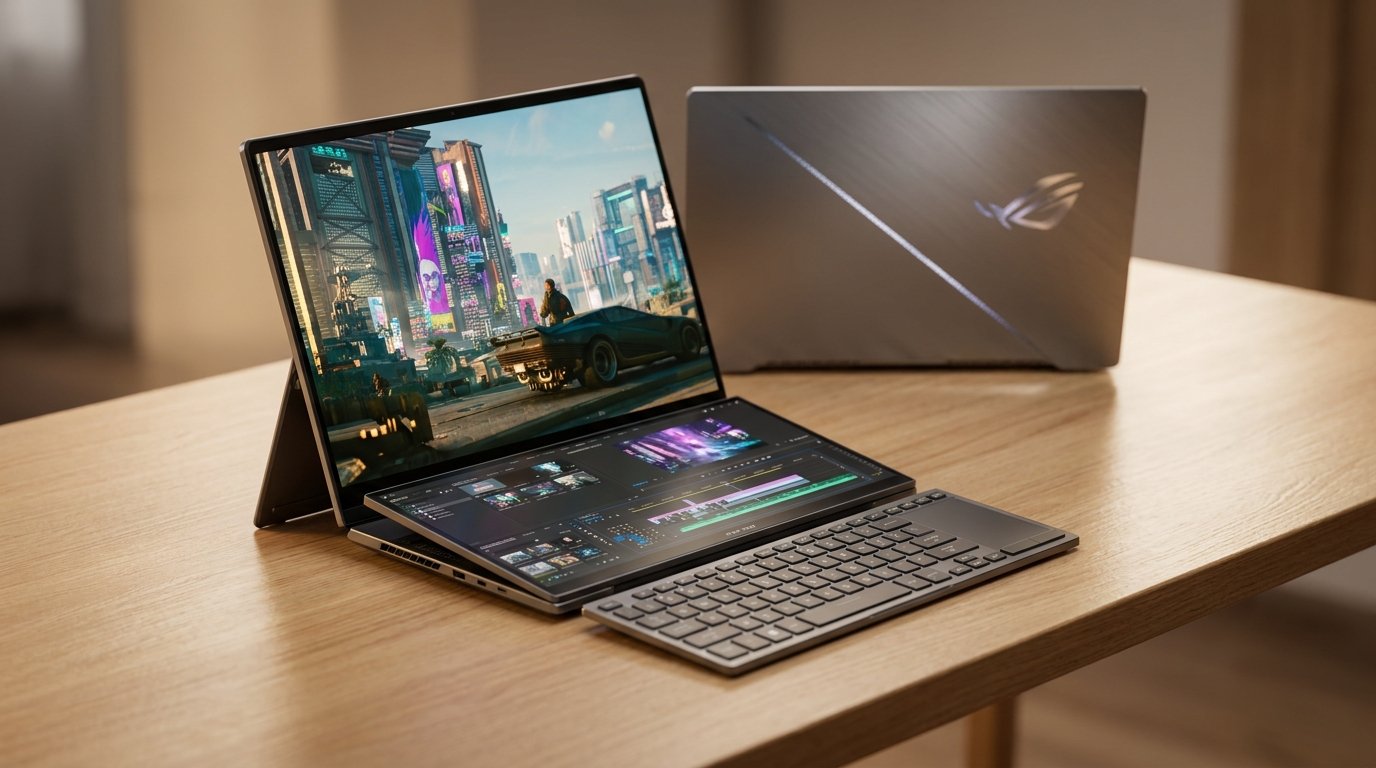
Is the Dual-Screen Future Worth $5,500?
The dream of a mobile workstation that doesn’t require an extra monitor is finally here, but it comes with a steep price tag and some surprising trade-offs. The ASUS Zephyrus Duo 16 review reveals a machine that is as much a piece of engineering art as it is a high-end gaming laptop. With dual OLED touchscreens and the latest NVIDIA RTX 50-series graphics, ASUS is pushing the boundaries of what a portable computer can do. However, as the old saying goes, having “more screens” often leads to “more problems.”
In this comprehensive ASUS Zephyrus Duo 16 review, we will look at how this 2026 model performs in the real world, from its record-breaking battery life to its unique ergonomic challenges.
Design and Build Quality: A Solid Foundation
Right out of the box, the Zephyrus Duo 16 feels like a premium product. It features a solid CNC aluminum chassisfinished in ASUS’s “Stellar Grey”. The build quality is exceptional; the device feels sturdy everywhere you touch, and there is minimal flex even when applying pressure.
On the lid, ASUS has included its signature “slash lighting”. This feature consists of 35 lighting sections and 15 built-in animations, all controllable through the Armoury Crate software. While it doesn’t help you finish your work faster, it certainly makes the laptop stand out in a crowded room.
The laptop’s weight is a factor to consider. Alone, the device weighs 6.2 lbs (2.8 kg). When you add the 250-watt power brick, the total travel weight jumps to 7.8 lbs (3.5 kg). While this is heavy for a 16-inch laptop, it is actually lighter than many other RTX 5090 competitors because its charger is smaller and lighter than the massive power bricks found with more power-hungry machines.
The Dual OLED Screens: A Visual Feast
The centerpiece of this laptop is undoubtedly its two 16-inch OLED touchscreen panels. Both screens are identical in their core specifications, which provides a seamless visual experience when moving windows between them.
Screen Specifications
| Feature | Specification |
|---|---|
| Panel Type | Dual OLED Touchscreens |
| Resolution | 2880 x 1800 (per screen) |
| Refresh Rate | 120Hz (60Hz on battery) |
| Response Time | 0.5ms |
| Peak Brightness | 1100 nits (HDR) |
| Sync Tech | G-Sync (Top screen only) |
The screens offer a significant brightness upgrade over previous OLED models, with sustained brightness reaching into the 500-nit range. Furthermore, the anti-reflective coating is highly effective, performing much better than glossy screens on rival laptops like the Razer Blade, which can often look like a mirror.
Multitasking and Ergonomics: The Double-Edged Sword
ASUS has designed the Duo 16 to be a “multitasker’s dream”. To make the dual screens useful, they’ve added several software shortcuts:
- Gestures: Tapping the second screen with six fingers brings up a virtual keyboard, while a three-finger tap launches a virtual touchpad.
- Window Management: You can “flick” windows between screens or use the F12 key to swap content between the top and bottom panels instantly.
The Five Modes of Use
The Duo 16 is versatile, but not all of its “modes” are equally useful.
- Laptop Mode: The standard setup for desk use.
- Dual Screen Mode: Uses the rear kickstand to lift the top screen closer to eye level, reducing neck strain.
- Book Mode: Places the screens vertically. However, it feels flimsy on its stand, and the screens sit at different angles.
- Tent & Sharing Modes: These are largely considered “gimmicks” as the hinge doesn’t allow the screen to fold back far enough to be a true tablet.
Performance: Why More Money Doesn’t Mean More Speed
One of the most important takeaways from this ASUS Zephyrus Duo 16 review is the performance-to-price ratio. My test unit came equipped with the NVIDIA GeForce RTX 5090 and Intel’s new Panther Lake processor.
While these parts are top-of-the-line, the Duo 16 is tuned for efficiency rather than raw power. To keep the touchscreens from becoming too hot to touch, ASUS limits the RTX 5090 to 137 watts in manual mode. Because of this, the Duo 16 is actually slower than cheaper laptops like the ASUS Scar 16 or the Lenovo Legion Pro 7, which allow their GPUs to use more power.
Join the Conversation at The GadgetNet!
Are you a tech wiz who loves deconstructing the latest hardware? At The GadgetNet, we are always looking for fresh voices to share their insights. If you have a knack for explaining complex tech in a way anyone can understand, we invite you to check out our write for us page. Join our community and help readers navigate the fast-paced world of modern gadgets!
Battery Life: A New World Record?
If there is one area where the Duo 16 absolutely destroys the competition, it is battery life. Thanks to the power-efficient Intel Panther Lake CPU, this laptop lasted almost 2 hours longer than the next best gaming laptop ever recorded by reviewers.
Even with both OLED screens running, the Duo 16 manages to outlast many single-screen competitors. This makes it a rare high-end gaming laptop that you can actually use on a long flight or at a coffee shop without rushing for a power outlet.
Keyboard, Touchpad, and Connectivity
The keyboard sits at the very front of the chassis to make room for the second screen. It is detachable and connects via magnets and pins. When detached, it operates via Bluetooth. While the 1.7mm key travel feels good, the keyboard only features 1-zone RGB lighting, which feels cheap for a $5,500 machine.
Port Selection
- Left/Right: Type-A and Type-C ports.
- Video: HDMI connects directly to the NVIDIA graphics via a MUX switch.
- Missing: There is no Ethernet port and, surprisingly, no Thunderbolt 5 support—only Thunderbolt 4.
Pros and Cons
Pros
- Incredible Multitasking: Dual 16-inch OLEDs provide unmatched screen real estate.
- Record-Breaking Battery: The most efficient 5090 laptop on the market.
- Eye-Level Comfort: The kickstand reduces neck strain during long sessions.
- Fast Response: 0.5ms OLED panels are perfect for gaming and content creation.
Cons
- Extremely Expensive: Starts at $4,500 and goes up to $5,500.
- Lower Performance: Slower than cheaper 5090 laptops due to power limits.
- Zero RAM Upgrades: The 64GB of RAM is soldered and cannot be changed.
- Heavier Build: At 6.2 lbs, it is a lot to carry around daily.
Comparison: Duo 16 vs. Competition
| Laptop Model | GPU Power (Max) | Battery Life Rank | Primary Feature |
|---|---|---|---|
| ASUS Zephyrus Duo 16 | 137W | #1 (Best) | Dual OLED Screens |
| ASUS ROG Scar 16 | ~175W+ | Average | Raw Gaming Power |
| Lenovo Legion Pro 7 | ~175W+ | Average | Value for Money |
| HP Omen MAX 16 | ~145W+ | Below Average | Balanced Performance |
Final Verdict
The ASUS Zephyrus Duo 16 review concludes that this is a niche masterpiece. It is the only option on the market if you need two screens in one package. For streamers who need to watch a chat window while gaming, or video editors who need a dedicated timeline screen, this laptop is a dream come true.
However, if your primary goal is the highest possible frame rates in games, you can spend $2,500 less on a Lenovo Legion and get better performance. You are paying a massive premium for the innovation of that second screen.
FAQs
1. Can the RAM be upgraded in the Zephyrus Duo 16? No. The RAM is soldered to the motherboard and cannot be upgraded after purchase. You must choose the amount you need (up to 64GB) at the time of buying.
2. Does the second screen support G-Sync? No. While both screens support Adaptive Sync, G-Sync is only available on the top screen when the discrete GPU is active.
3. Why is it slower than other RTX 5090 laptops? ASUS intentionally limited the power to 137 watts to prevent the dual touchscreens from getting too hot and to keep the laptop thin and relatively quiet.
4. Can I use the Duo 16 as a tablet? No. The hinge design only allows for a “tent mode.” It does not fold 360 degrees, so it cannot function as a tablet.
5. How do I protect the OLED screens from burn-in? ASUS includes several software features in the Armoury Crateapp specifically designed to reduce the risk of OLED burn-in over time.

